
Bluebeam Software Uses: 10 Ways to Improve Structural Engineering Workflows

If you manage structural drawings in India, you already know the drill. Printed mark-up sets travel by courier between the office and the site. Revision histories live in email threads that nobody can reconstruct. Takeoff quantities get transcribed by hand into Excel, only to be re-entered when drawings change.
The frustrating part? None of this is caused by a lack of engineering expertise. It is a workflow problem, and workflow problems need smarter solutions.
Bluebeam Software Uses: 68% of early AI adopters in the AEC industry have saved at least $50,000, while 46% have saved 500–1,000 hours using AI tools, according to the Bluebeam report of the 2026 AEC Technology Outlook .
This is where Bluebeam PDF software comes in. Designed for architecture, engineering & construction (AEC) professionals, Bluebeam brings PDF markup tools, revision comparison, quantity takeoffs, and team collaboration into one environment.
Understanding the different uses of Bluebeam software can help structural consultants, contractors, fabricators, and engineering teams identify opportunities to simplify documentation, improve coordination, and manage project workflows more efficiently. Let’s look at what Bluebeam can do for your team.
Practical Bluebeam Software Uses for Structural Engineering & AEC Teams
Structural Drawing Review and Annotation with Markups
Reviewing RCC drawings, reinforcement details, and foundation plans becomes difficult when multiple engineers use inconsistent symbols, comments, and revision markups.
Bluebeam Revu simplifies reviews through Tool Chest, which stores reusable engineering symbols, callouts, and revision clouds. Its Markups List tracks comments, authors, and review statuses, helping engineering teams speed up drawing reviews, maintain consistent annotations, and reduce repetitive work.
Arup has used Bluebeam Revu to standardize drawing markups and improve design review workflows across its teams. Its experience demonstrates the value of reusable markup tools in maintaining consistency across engineering projects.

Drawing Revision Comparison and Change Detection
Comparing successive architectural, structural and MEP drawing revisions manually can cause engineers to overlook changes in dimensions, gridlines, member sizes or connection details.
Bluebeam Revu’s Compare Documents automatically identifies differences between two PDF versions, while Overlay Pages places revisions in different colors to highlight additions and modifications. These tools help reviewers identify changes faster and verify revised drawings before construction.
Construction Quantity Takeoff and Measurement
Manually measuring concrete quantities, slab areas, excavation dimensions and structural elements from printed drawings can slow down estimation, particularly when projects involve hundreds of sheets.
Bluebeam Revu provides Length, Area, Volume, Count, and Dynamic Fill measurement tools for performing calibrated takeoffs directly on drawings using the Bluebeam PDF Editor online. Each measurement appears on the drawing and in the Markups List, allowing estimators to review quantities and export measurement data for further calculations.
Adotta,the estimating team adopted Bluebeam to perform PDF-based quantity takeoffs and transfer measurement data into Excel. This helped eliminate manual data re-entry, reduce transcription errors & improve estimating accuracy.
BOQ Preparation and Construction Cost Estimation
Preparing a Bill of Quantities (BOQ) involves measuring drawing elements, recording quantities and updating estimates whenever design revisions arrive. Re-entering these measurements into spreadsheets can increase estimation time and introduce errors.
Bluebeam Revu’s Quantity Link connects drawing measurements with Microsoft Excel, allowing quantity data to update as markups change. Estimators can retain their existing Excel formulas, rate analysis and costing templates while reducing repetitive data entry.
Note: Bluebeam supports drawing-based measurements and Excel integration; it does not automatically generate a complete Indian-format BOQ or apply the Schedule of Rates.
Shop Drawing and Fabrication Drawing Review
Steel fabricators and detailing teams frequently review connection details, weld specifications, dimensions & fabrication drawings before releasing packages for production. Delayed markups and repeated drawing exchanges can hold up fabrication activities.
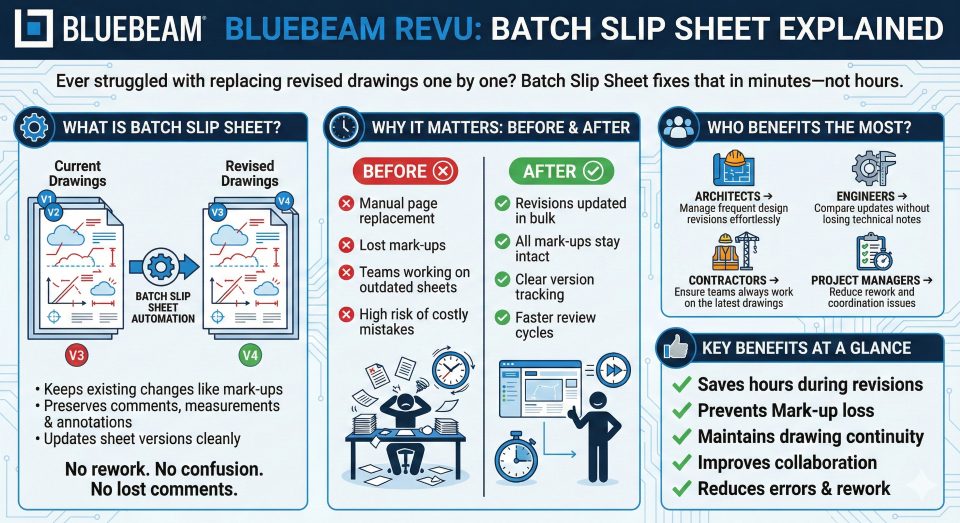
Bluebeam Revu allows reviewers to annotate shop drawings, apply custom stamps, compare revisions & organise comments using the Markups List. Batch Slip Sheet can replace superseded drawing sheets while retaining relevant markup information, helping teams manage revised drawing packages.
RFI and Technical Query Tracking
When site engineers encounter conflicting dimensions, missing specifications or unclear structural details, they need timely responses from consultants. Tracking these queries across separate emails and spreadsheets can make it difficult to monitor ownership and response status.
Bluebeam supports drawing-linked RFI management, allowing teams to place questions directly on PDF sheets, attach snapshots, assign reviewers, and track due dates and statuses. Its reporting capabilities help teams maintain an organized record of outstanding technical queries.
Forcia: The UK contractor used Bluebeam Software for digital RFI process for construction and refurbishment projects. Its experience demonstrates how connecting queries with drawing references can improve communication and reduce manual follow-ups.
Site Inspection and Punch List Management
During construction inspections and project handovers, engineers must record defects, incomplete work, and corrective actions. Maintaining separate photographs, handwritten observations & spreadsheets can make it difficult to identify the exact location of each issue.
Bluebeam’s mobile markup, photo capture, custom statuses & spaces help site teams document punch-list items directly on drawings. Issues can be assigned to responsible parties, tracked through completion & included in progress reports.
DES Architects + Engineers: The firm DES adopted Bluebeam for punch-list workflows and reported reducing the time required to create and distribute punch lists by 50–65%, helping it meet challenging project closeout schedules.
BIM and Multidisciplinary Design Coordination
Structural, architectural and MEP teams often work with different design models and drawing revisions. Coordinating feedback across disciplines can become difficult when comments are disconnected from the relevant drawing views.
Bluebeam supports PDF-based BIM coordination through Revit Connected Sessions, Studio Sessions and 3D PDF markups. Revit Connected Sessions link Revu markups with corresponding locations in Revit views, helping teams review and communicate design comments with better context.
CADFORC, the engineering and design services company, adopted Bluebeam Revu to streamline the delivery of project information directly from BIM. By linking PDF drawings with relevant 3D views, equipment plans and supporting documents, CADFORCE made complex project information easier to access and distribute, demonstrating how PDF-based workflows can complement BIM design and coordination processes.
Bluebeam Construction Document Management for Real-Time Collaboration
Large construction projects generate hundreds of drawings, specifications and revisions shared between consultants, contractors and project teams. Managing these documents through scattered folders and email attachments can create version-control challenges.
Bluebeam’s Studio Projects provides cloud-based document storage and version management, while Studio Sessions allows multiple stakeholders to review and annotate shared PDFs. Teams can maintain project documentation and collaborate without circulating separate marked-up copies.
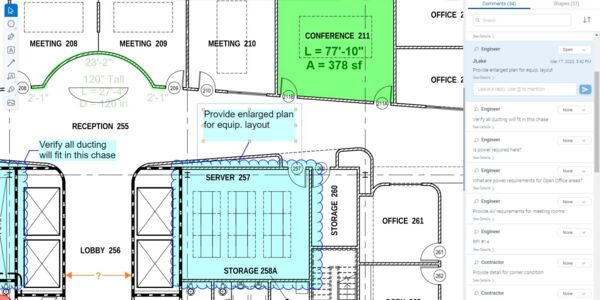
AECOM Austin’s has a $1 billion school modernization program. AECOM adopted Bluebeam Studio Sessions to streamline design reviews, cost management and contractor coordination across multiple projects. The team used Studio Sessions to manage more than 100,000 comments from over 400 collaborators, enabling stakeholders to review feedback, track responses and close out comments more efficiently.
AI-Powered Drawing Review and Workflow Automation
Reviewing large drawing packages involves repetitive activities such as identifying design changes, locating information & updating annotations. These tasks can consume considerable time across complex AEC projects.
Bluebeam Max introduces advanced capabilities such as Smart Review, Smart Overlay, AI integration through MCP, Stitching, and Magic Markups. These features support AI-assisted drawing checks, revision comparisons, natural-language workflows and faster handling of repetitive markup operations.
Foresight Custom Homes: Steve McElwee highlighted how AI-powered drawing reviews help identify potential issues during preconstruction.
So, are you still managing your engineering workflows the old way?
- Manual drawing comparisons and missed revisions?
- Repetitive quantity takeoffs and Excel updates?
- Delayed shop drawing reviews and technical queries?
- Scattered project documents and coordination issues?
- Time-consuming site inspections and punch lists?
These challenges don’t have to be part of your everyday workflow. Bluebeam Software offers a smarter way to manage these processes and improve efficiency in your engineering operations.
Get More from Bluebeam Software with the Right Implementation Partner
Knowing what Bluebeam Revu can do is one thing. Making it work effectively across your engineering and construction workflows is another.
As an Authorized Bluebeam Partner in India, Nhance Digital Solutions helps AEC companies make the most of Bluebeam Revu. We help align its capabilities with your engineering and construction workflows, so your teams can move beyond manual processes and work more efficiently.
How does nhance Digital Solutions help you get more from Bluebeam?
Choosing Bluebeam is just the first step. Getting your team to use it effectively requires the right setup, training & ongoing support. Nhance Digital Solutions helps AEC businesses in India make the most of Bluebeam Revu at every stage.
- Bluebeam Software Licensing in India: Get the right Bluebeam Revu license for your team’s requirements, with expert guidance on plan selection and licensing.
- Smooth Onboarding and Implementation: Get assistance with license activation, initial setup, and configuring Revu to align with your project workflows.
- Practical, Role-Based Training: Help engineers, architects and project teams master drawing markups, measurements, document reviews and collaboration through hands-on training.
- Reliable Technical Support: Get expert assistance with technical issues, troubleshooting, and product-related queries so your team can work with fewer interruptions.
- Product Demonstrations: See Bluebeam Revu Software in action and understand how its capabilities can address your team’s everyday project challenges.
Ready to Get Started? Request a FREE Bluebeam Software Demo in India.
See how Bluebeam Revu can transform your engineering and construction workflows.
Click here to fill out the Contact Us form, and our team will get in touch to understand your requirements and schedule a personalized demo. Prefer speaking with us directly? Call 7331111138.
Frequently Asked Questions About Bluebeam Software
Q1. How much does Bluebeam Revu cost in India?
Ans. The cost of Bluebeam software depends on the subscription plan, number of users, and licensing requirements. With four plans: Basics, Core, Complete, and Max. You can choose capabilities that match your team’s workflows & budget. Contact Nhance Digital Solutions for current India-specific pricing and licensing assistance.
Q2. Which Bluebeam Revu subscription plan is best for my engineering team?
Ans. The right plan depends on your team’s requirements. Basics suits essential PDF markups; Core adds advanced measurements and collaboration; Complete supports advanced takeoffs and automation; and Max includes additional AI capabilities. Nhance can help you identify the right plan based on your project workflows.
Q3. Is Bluebeam Revu worth it for construction and engineering companies?
Ans. If your team regularly reviews drawings, compares revisions, performs quantity takeoffs or coordinates project documents, Bluebeam Revu can help reduce repetitive work and improve collaboration. Its value depends on how frequently your team uses these capabilities and how effectively they are implemented.
Q4. What are the benefits of using Bluebeam for construction projects?
Ans. Bluebeam construction software helps teams review drawings, compare revisions, perform digital quantity takeoffs, and collaborate through shared PDF documents. Bluebeam Revu features such as Tool Chest, Markups List, and Studio help standardize reviews, track comments, and improve project documentation workflows.
Q5. Can Bluebeam software integrate with AutoCAD, Revit and other AEC software?
Ans. Yes. Bluebeam for AEC Industry offers plugins for applications such as AutoCAD, Revit and Navisworks, along with integrations for platforms including SharePoint and ProjectWise. These connections help teams create, manage, and review project documents while maintaining continuity with existing workflows. Availability depends on the application and subscription plan.
Q6. Where can I buy Bluebeam Revu software and get training in India?
Ans. Nhance Digital Solutions is an Authorized Bluebeam Partner in India, offering genuine software licensing, Bluebeam demo in India, implementation assistance, and training. Connect with Nhance to explore subscription options and help your engineering team get more value from Bluebeam.